Alpha
The Alpha snapshot creates practice ECX that can be used to test the network and compatible wallets.
 ECXIUM
Bitcoin 주소가 eCash (ECX) 대상이라면 해당 Bitcoin 지갑을 ECXIUM으로 가져와 ECX에 접근할 수 있습니다. 별도의 수동 claim transaction이나 split 버튼은 필요하지 않습니다.
적격 Bitcoin 지갑을 가져오면 ECXIUM이 safe coin splitting과 replay protection을 자동으로 처리합니다.
관련 snapshot 시점에 Bitcoin 주소에 BTC가 있었다면 해당 ECX network stage에 연결된 ECX 잔액이 생성됩니다.
Bitcoin이 ECX로 변환되거나 Bitcoin 네트워크를 떠나는 것은 아닙니다. fork 이후 BTC와 ECX는 독립적으로 존재합니다.
ECXIUM으로 ECX에 접근하려면 적격 주소를 통제하는 Bitcoin 지갑을 가져오세요. ECXIUM이 해당 ECX를 감지하고 safe separation/replay protection을 관리합니다.
별도의 Claim 또는 수동 Split 버튼은 없습니다.
BTC는 Bitcoin에 남습니다. ECX는 별도의 eCash 네트워크에 존재합니다. Wallet import는 BTC를 ECX로 변환하지 않습니다.
BTC와ECX 분리 방법
Learn how BTC and ECX are safely separated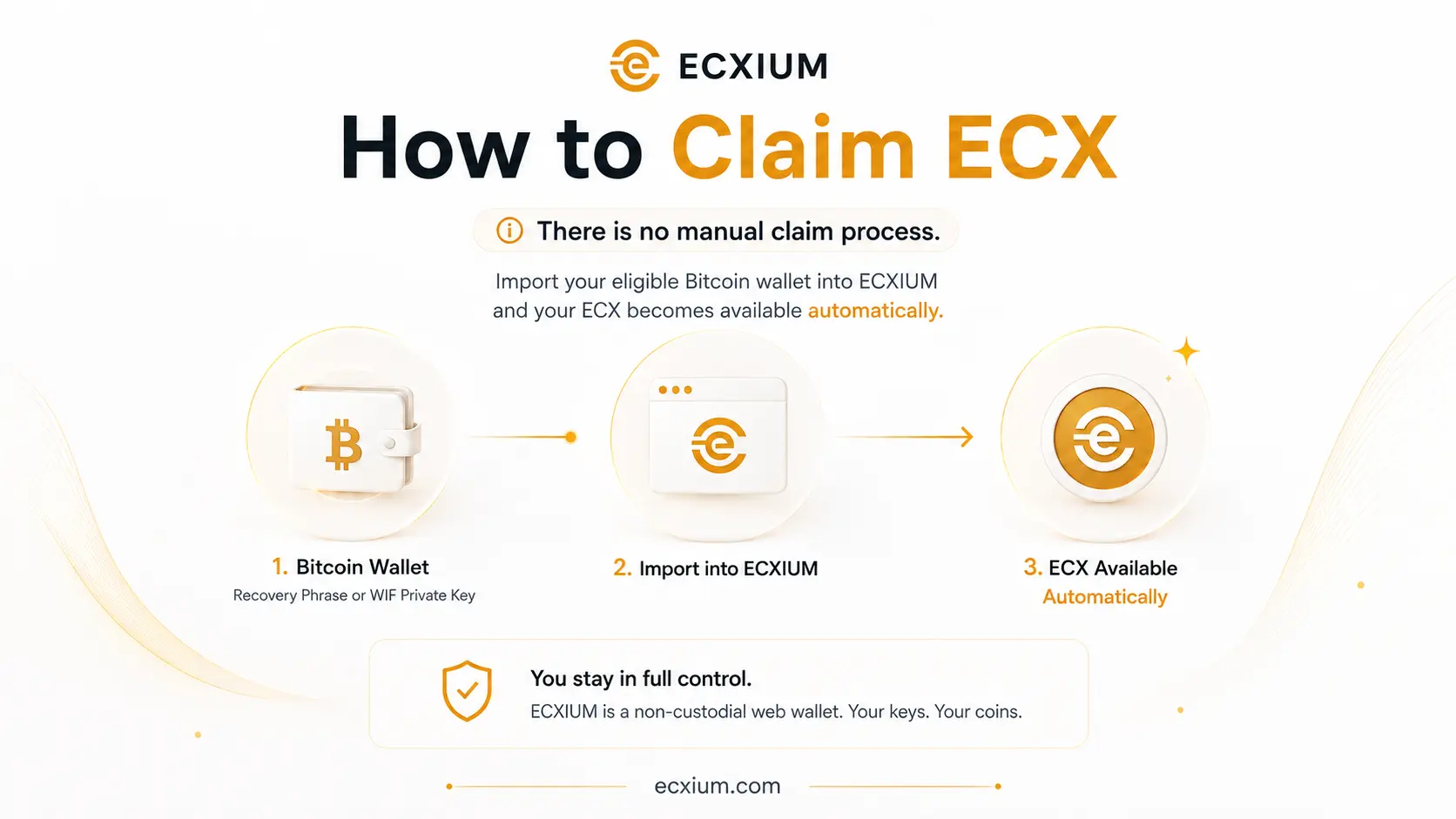
The ECX network launches in three stages. ECX Beta Testnet is now the active stage and uses practice ECX. Alpha was the first practice stage, while permanent ECX is established at Mainnet.
| 단계 | Block 네트워크 | 잔액 | Alpha |
|---|---|---|---|
| ~963,648 ECX Alpha Testnet | Practice ECX | Beta | 967,680 ECX Beta Testnet |
| Practice ECX | Mainnet | ~973,728 ECX Mainnet | Permanent ECX |
| Mainnet | ~973,728 | ECX Mainnet | Permanent ECX |
The Alpha snapshot creates practice ECX that can be used to test the network and compatible wallets.
Beta is the second testing stage before the permanent ECX network begins.
The mainnet snapshot establishes permanent ECX balances.
Alpha와 Beta는 Practice ECX를 사용합니다. Mainnet의 Permanent ECX와 혼동하지 마세요.
Recovery Phrase/private key를 public checker에 입력하지 마세요. checker는 외부 서비스이며 ECXIUM이 운영하지 않습니다.
wallet.ecxium.org을 열고 Import Wallet을 선택합니다.
호환되는 Recovery Phrase 또는 WIF private key를 선택합니다.
가져온 Bitcoin 주소에 관련 ECX 잔액이 있다면 ECXIUM이 해당 잔액에 접근합니다.
필요한 경우 coin splitting과 replay protection이 자동으로 처리됩니다.
network stage에 따라 Alpha/Beta Practice ECX 또는 Mainnet Permanent ECX가 표시될 수 있습니다.
호환되는 지갑을 Recovery Phrase로 가져옵니다. wallet 구조와 phrase에서 파생되는 주소를 복원할 수 있습니다.
특정 Bitcoin 주소를 WIF private key로 가져옵니다. WIF는 특정 key/address를 나타내며 전체 phrase-based wallet을 의미하지 않습니다.
ECXIUM handles coin splitting and replay protection automatically when you import an eligible Bitcoin wallet.
Bitcoin과 ECX는 fork 이전 shared history를 가지므로 안전한 분리 이전에는 replay risk가 있을 수 있습니다.
ECXIUM은 적격 Bitcoin wallet import에서 필요한 wallet-side safe separation과 replay protection flow를 관리하므로 사용자가 수동으로 replay-protection transaction을 만들 필요가 없습니다.
ECXReplay Protection
Read ECX Replay ProtectionBitcoin 지갑을 가져오세요. ECXIUM이 필요한 과정을 처리합니다.
다음 작업은 필요하지 않습니다. - 수동 claim transaction 생성 - 별도의 coin splitting service 사용 - replay-protection transaction 직접 생성 - 해당 ECX에 접근하기 위해 BTC 이동
Import Wallet → Wallet Imported → ECX Detected → Ready to Use
"수동 split이 필요 없다"는 것은 BTC와 ECX를 안전하게 분리할 필요가 없다는 뜻이 아닙니다. 필요한 경우 ECXIUM이 자동 처리합니다.
"No manual split required" does not mean that BTC and ECX do not need to be safely separated. ECXIUM performs this process automatically for you.
Claiming or accessing ECX does not convert your Bitcoin into ECX.
Your BTC remains on the Bitcoin network and your ECX exists separately on the eCash network.
However, Bitcoin and ECX originate from the same pre-fork transaction history. This is why replay protection and safe coin splitting matter when using post-fork funds.
아니요. BTC는 Bitcoin 네트워크에 남고 ECX는 별도의 eCash 네트워크에 존재합니다.
다만 shared pre-fork transaction history 때문에 post-fork 자산을 관리할 때 replay protection과 safe coin splitting이 중요합니다.
If your Bitcoin wallet is backed up with a compatible Recovery Phrase, you can use that phrase to import the wallet into ECXIUM.
호환되는 Recovery Phrase는 여러 Bitcoin 주소를 통제할 수 있습니다. ECXIUM은 지원되는 derived address와 관련 ECX 잔액을 식별할 수 있습니다.
Recovery Phrase는 지갑 자산에 대한 통제권을 제공합니다. eligibility checker, 검색엔진, 메신저 또는 관련 없는 사이트에 입력하지 마세요.
If you control a Bitcoin address through a WIF private key, you can import that key directly into ECXIUM.
This method is useful when you want to access ECX associated with a specific eligible Bitcoin address rather than restore an entire Recovery Phrase wallet.
특정 적격 Bitcoin 주소에 연결된 ECX에 접근하려면 해당 WIF private key를 가져옵니다.
snapshot 당시 BTC가 exchange 또는 custodial service에 있었다면 private key는 일반적으로 custodian이 통제합니다.
이 경우 ECX 접근 여부는 플랫폼이 fork/distribution을 지원하는지에 달려 있습니다.
적격 Bitcoin 주소의 key 또는 Recovery Phrase를 직접 가지고 있지 않다면 ECXIUM은 custodial account에서 ECX를 복구할 수 없습니다.
Self-custody: 사용자가 key를 통제합니다. Exchange custody: ECX distribution은 exchange 지원에 따라 달라질 수 있습니다.
ECXIUM에서: - ECX 잔액 확인 - ECX 받기 - ECX 보내기 - transaction history 확인 - QR 코드 사용 - wallet 유형에 따른 주소 관리
Beta에서는 UI에 ECX Beta Testnet / Practice ECX가 명확하게 표시되어야 합니다.
ECXIUM은 eCash (ECX)를 위한 독립 지갑입니다.
아니요. 적격 Bitcoin 지갑을 import하면 ECXIUM이 해당 ECX를 감지합니다.
replay protection을 위해 안전한 분리가 필요할 수 있으며 ECXIUM이 이를 자동 관리합니다.
아니요.
아니요.
아니요. Permanent ECX는 Mainnet에서 시작됩니다.
public Bitcoin address만 사용하세요.
exchange가 key를 통제했다면 해당 플랫폼의 지원에 달려 있습니다.
네. 호환되는 특정 key/address에 사용할 수 있습니다.
네. 호환되는 wallet에서 사용할 수 있습니다.
아니요. ECXIUM은 eCash (ECX)를 위한 독립 non-custodial wallet입니다.
Import your eligible Bitcoin wallet into ECXIUM. Safe coin splitting and replay protection are handled automatically.